Post-Search Recalibrator Node
Performs a recalibration of the precursor masses based on the results of a previous search.
Downloads for 2 Proteome Discoverer versions
3954559dade448bd747331672e6d3406bf85d1db427a907197f8372860d2b3dcChecksums and download command
| SHA-256 | 3954559dade448bd747331672e6d3406bf85d1db427a907197f8372860d2b3dc |
|---|---|
| MD5 | 27a030363ac8e2bf7efcc3e3c314910d |
Downloads the file and checks its SHA-256; a click selects a whole checksum or command.
$ProgressPreference = 'SilentlyContinue'; $f = 'postsearchmassrecalibrator_1.4.zip'; Invoke-WebRequest -Uri 'https://ms.imp.ac.at/data/recalibrator/postsearchmassrecalibrator_1.4.zip' -OutFile $f; if ((Get-FileHash $f -Algorithm SHA256).Hash -eq '3954559dade448bd747331672e6d3406bf85d1db427a907197f8372860d2b3dc') { "OK: $f" } else { Remove-Item $f; Write-Error 'Checksum mismatch, file deleted' }curl -fL -o 'postsearchmassrecalibrator_1.4.zip' 'https://ms.imp.ac.at/data/recalibrator/postsearchmassrecalibrator_1.4.zip' && echo '3954559dade448bd747331672e6d3406bf85d1db427a907197f8372860d2b3dc postsearchmassrecalibrator_1.4.zip' | sha256sum -c -curl -fL -o 'postsearchmassrecalibrator_1.4.zip' 'https://ms.imp.ac.at/data/recalibrator/postsearchmassrecalibrator_1.4.zip' && echo '3954559dade448bd747331672e6d3406bf85d1db427a907197f8372860d2b3dc postsearchmassrecalibrator_1.4.zip' | shasum -a 256 -c -2dd5415efc9540d2763ac384db20c06b057cbf512a8710032606899e0655686cChecksums and download command
| SHA-256 | 2dd5415efc9540d2763ac384db20c06b057cbf512a8710032606899e0655686c |
|---|---|
| MD5 | dce6897278d3682af699f509fa9eb9b6 |
Downloads the file and checks its SHA-256; a click selects a whole checksum or command.
$ProgressPreference = 'SilentlyContinue'; $f = 'postsearchmassrecalibrator_1.3.zip'; Invoke-WebRequest -Uri 'https://ms.imp.ac.at/data/recalibrator/postsearchmassrecalibrator_1.3.zip' -OutFile $f; if ((Get-FileHash $f -Algorithm SHA256).Hash -eq '2dd5415efc9540d2763ac384db20c06b057cbf512a8710032606899e0655686c') { "OK: $f" } else { Remove-Item $f; Write-Error 'Checksum mismatch, file deleted' }curl -fL -o 'postsearchmassrecalibrator_1.3.zip' 'https://ms.imp.ac.at/data/recalibrator/postsearchmassrecalibrator_1.3.zip' && echo '2dd5415efc9540d2763ac384db20c06b057cbf512a8710032606899e0655686c postsearchmassrecalibrator_1.3.zip' | sha256sum -c -curl -fL -o 'postsearchmassrecalibrator_1.3.zip' 'https://ms.imp.ac.at/data/recalibrator/postsearchmassrecalibrator_1.3.zip' && echo '2dd5415efc9540d2763ac384db20c06b057cbf512a8710032606899e0655686c postsearchmassrecalibrator_1.3.zip' | shasum -a 256 -c -Not supported: Proteome Discoverer 2.0, 2.1, 2.2, 2.3, 2.4, 2.5, 3.0, 3.1, 3.2, 3.3.
Download and Installation
- Save all your files and shutdown Thermo Scientific Proteome Discoverer.
- Download the node’s DLL (for PD 1.3.x or PD 1.4.x)
- Copy the downloaded DLLs to the Proteome Discoverer Release folder, e.g.: "C:\Program Files\Thermo\Discoverer Demo 1.3\System\Release".
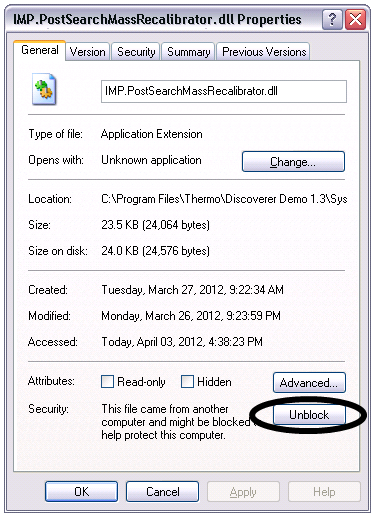
- For each DLL: Right-click the DLL, open its properties window and click the Unblock botton, if available.
- Open a command prompt and navigate to the Proteome Discoverer Release folder.
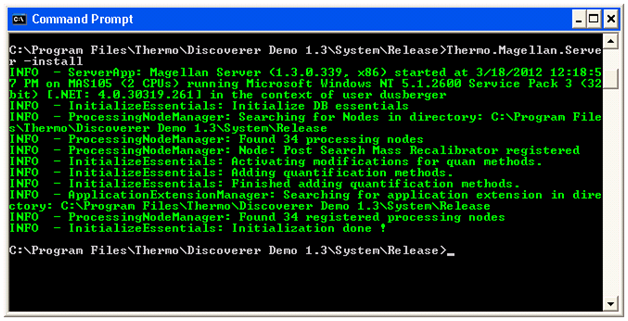
- Enter “Thermo.Magellan.Server –install” (without the quotes).
- You should see the message, indicating that the installation worked sucessfully: "INFO - ProcessingNodeManager: Node: Post Search Mass Recalibrator registered."
Functionality
The node performs a recalibration of the precursor masses based on the results of a previous search. The (precursor-m/z, ppm error)-pairs of the high-scoring PSMs are extracted and a regression curve is fitted through these data points. This curve is used to adjust all precursor-m/z values in preparation of a second search. It is possible to define the degree of the polynomial to be used for the fitting.
Usage
Although it is possible to append the Post-Search Mass Recalibrator node to a search and directly add the second search in one workflow, it is not recommended to do so. The structure of the .msf files generated by PD does not allow the removal of the results of the first search. Therefore both search results would occur in the results. Figure 1 shows the workflow to create an input file whose spectra have recalibrated precursor masses by using the Spectrum Exporter node. This file can then be used as input for another workflow where the actual search is conducted.
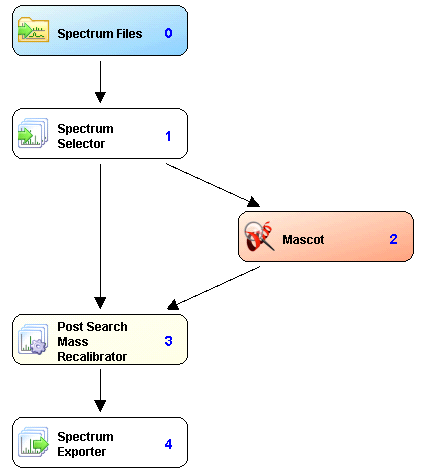
Figure 1: Proposed workflow for the usage of the Post-Search Mass Recalibrator node to generate a recalibrated input file