Node-Manager
A program to manage your Proteome Discoverer Nodes.
Downloads for 4 Proteome Discoverer versions
606270d2586d5af786d0b0c0e2a6f97085b61a07b8e3dcb2e5d96278eaddc92bChecksums and download command
| SHA-256 | 606270d2586d5af786d0b0c0e2a6f97085b61a07b8e3dcb2e5d96278eaddc92b |
|---|---|
| MD5 | 2cd8f36676224e852285dd8126435a0f |
Downloads the file and checks its SHA-256; a click selects a whole checksum or command.
$ProgressPreference = 'SilentlyContinue'; $f = 'Node-Manager-installer.exe'; Invoke-WebRequest -Uri 'https://ms.imp.ac.at/data/node-manager/Node-Manager-installer.exe' -OutFile $f; if ((Get-FileHash $f -Algorithm SHA256).Hash -eq '606270d2586d5af786d0b0c0e2a6f97085b61a07b8e3dcb2e5d96278eaddc92b') { "OK: $f" } else { Remove-Item $f; Write-Error 'Checksum mismatch, file deleted' }curl -fL -o 'Node-Manager-installer.exe' 'https://ms.imp.ac.at/data/node-manager/Node-Manager-installer.exe' && echo '606270d2586d5af786d0b0c0e2a6f97085b61a07b8e3dcb2e5d96278eaddc92b Node-Manager-installer.exe' | sha256sum -c -curl -fL -o 'Node-Manager-installer.exe' 'https://ms.imp.ac.at/data/node-manager/Node-Manager-installer.exe' && echo '606270d2586d5af786d0b0c0e2a6f97085b61a07b8e3dcb2e5d96278eaddc92b Node-Manager-installer.exe' | shasum -a 256 -c -606270d2586d5af786d0b0c0e2a6f97085b61a07b8e3dcb2e5d96278eaddc92bChecksums and download command
| SHA-256 | 606270d2586d5af786d0b0c0e2a6f97085b61a07b8e3dcb2e5d96278eaddc92b |
|---|---|
| MD5 | 2cd8f36676224e852285dd8126435a0f |
Downloads the file and checks its SHA-256; a click selects a whole checksum or command.
$ProgressPreference = 'SilentlyContinue'; $f = 'Node-Manager-installer.exe'; Invoke-WebRequest -Uri 'https://ms.imp.ac.at/data/node-manager/Node-Manager-installer.exe' -OutFile $f; if ((Get-FileHash $f -Algorithm SHA256).Hash -eq '606270d2586d5af786d0b0c0e2a6f97085b61a07b8e3dcb2e5d96278eaddc92b') { "OK: $f" } else { Remove-Item $f; Write-Error 'Checksum mismatch, file deleted' }curl -fL -o 'Node-Manager-installer.exe' 'https://ms.imp.ac.at/data/node-manager/Node-Manager-installer.exe' && echo '606270d2586d5af786d0b0c0e2a6f97085b61a07b8e3dcb2e5d96278eaddc92b Node-Manager-installer.exe' | sha256sum -c -curl -fL -o 'Node-Manager-installer.exe' 'https://ms.imp.ac.at/data/node-manager/Node-Manager-installer.exe' && echo '606270d2586d5af786d0b0c0e2a6f97085b61a07b8e3dcb2e5d96278eaddc92b Node-Manager-installer.exe' | shasum -a 256 -c -606270d2586d5af786d0b0c0e2a6f97085b61a07b8e3dcb2e5d96278eaddc92bChecksums and download command
| SHA-256 | 606270d2586d5af786d0b0c0e2a6f97085b61a07b8e3dcb2e5d96278eaddc92b |
|---|---|
| MD5 | 2cd8f36676224e852285dd8126435a0f |
Downloads the file and checks its SHA-256; a click selects a whole checksum or command.
$ProgressPreference = 'SilentlyContinue'; $f = 'Node-Manager-installer.exe'; Invoke-WebRequest -Uri 'https://ms.imp.ac.at/data/node-manager/Node-Manager-installer.exe' -OutFile $f; if ((Get-FileHash $f -Algorithm SHA256).Hash -eq '606270d2586d5af786d0b0c0e2a6f97085b61a07b8e3dcb2e5d96278eaddc92b') { "OK: $f" } else { Remove-Item $f; Write-Error 'Checksum mismatch, file deleted' }curl -fL -o 'Node-Manager-installer.exe' 'https://ms.imp.ac.at/data/node-manager/Node-Manager-installer.exe' && echo '606270d2586d5af786d0b0c0e2a6f97085b61a07b8e3dcb2e5d96278eaddc92b Node-Manager-installer.exe' | sha256sum -c -curl -fL -o 'Node-Manager-installer.exe' 'https://ms.imp.ac.at/data/node-manager/Node-Manager-installer.exe' && echo '606270d2586d5af786d0b0c0e2a6f97085b61a07b8e3dcb2e5d96278eaddc92b Node-Manager-installer.exe' | shasum -a 256 -c -606270d2586d5af786d0b0c0e2a6f97085b61a07b8e3dcb2e5d96278eaddc92bChecksums and download command
| SHA-256 | 606270d2586d5af786d0b0c0e2a6f97085b61a07b8e3dcb2e5d96278eaddc92b |
|---|---|
| MD5 | 2cd8f36676224e852285dd8126435a0f |
Downloads the file and checks its SHA-256; a click selects a whole checksum or command.
$ProgressPreference = 'SilentlyContinue'; $f = 'Node-Manager-installer.exe'; Invoke-WebRequest -Uri 'https://ms.imp.ac.at/data/node-manager/Node-Manager-installer.exe' -OutFile $f; if ((Get-FileHash $f -Algorithm SHA256).Hash -eq '606270d2586d5af786d0b0c0e2a6f97085b61a07b8e3dcb2e5d96278eaddc92b') { "OK: $f" } else { Remove-Item $f; Write-Error 'Checksum mismatch, file deleted' }curl -fL -o 'Node-Manager-installer.exe' 'https://ms.imp.ac.at/data/node-manager/Node-Manager-installer.exe' && echo '606270d2586d5af786d0b0c0e2a6f97085b61a07b8e3dcb2e5d96278eaddc92b Node-Manager-installer.exe' | sha256sum -c -curl -fL -o 'Node-Manager-installer.exe' 'https://ms.imp.ac.at/data/node-manager/Node-Manager-installer.exe' && echo '606270d2586d5af786d0b0c0e2a6f97085b61a07b8e3dcb2e5d96278eaddc92b Node-Manager-installer.exe' | shasum -a 256 -c -Not supported: Proteome Discoverer 1.3, 1.4, 2.0, 2.5, 3.0, 3.1, 3.2, 3.3.
Features
This software has been developed to be used with the Thermo Scientific Proteome Discoverer software, version 2.1.x and 2.3.x, although it should work with most versions. It uses a graphical user interface to display currently installed nodes and to download and update nodes from various sources.
- Download and Update Nodes from various sources.
- Group your nodes together, so you know which files belong to which node.
- Possibility to Auto-Sort your files, so they're grouped for their respective nodes.
- Simple one-click installation of your nodes to your Proteome Discoverer installation.
- The possibility to save your node configuration and restore it later.
- Lets you start Proteome Discoverer from within the graphical user interface.
- Highly adaptable und customisable with different settings [work in progress].
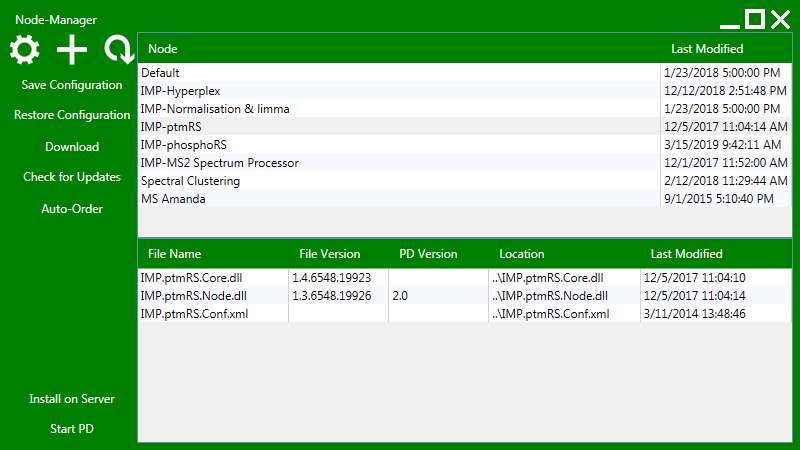
Usage
Just start the Node-Manager.exe to open the graphical user interface.
Download and installation
- Download the setup file here.
- Save all your files and shutdown Thermo Scientific Proteome Discoverer.
- Execute the installation file. Just run the installation file for all of them and change the installation directory to the one of your Proteome Discoverer version.
A text manual for the installation and the usage can be found here.
BEWARE:
Make sure, that the Node-Manager is always installed in a subfolder of your Proteome Discoverer installation (where "Thermo.Discoverer.exe" is). Otherwise, the Node-Manager will not show you your installed nodes and cannot start Proteome Discoverer!
TIP:
If you're not interested in the version of your nodes displayed by Proteome Discoverer (the "PD Version" column), just uncheck "Read PD Attributes" in the settings. It will significantly improve the speed of the Node-Manager.