
MS Ana
MS Ana is a scoring system to identify peptides in tandem mass spectrometry data using a library of previously identified spectra. Furthermore, MS Ana can create decoy spectral libraries for validation and run searches for additional modifications not found in the spectral library.
Downloads for 2 Proteome Discoverer versions
3c3c483b77c3df04e4bb2ef2e65c13e2e8c0868caab9aa8f7b2e696a49b933b4Checksums and download command
| SHA-256 | 3c3c483b77c3df04e4bb2ef2e65c13e2e8c0868caab9aa8f7b2e696a49b933b4 |
|---|---|
| MD5 | 4f87357e44908dcf9960bce0a5601b02 |
Downloads the file and checks its SHA-256; a click selects a whole checksum or command.
$ProgressPreference = 'SilentlyContinue'; $f = 'MS_Ana_PD31_Node_1_2_21221.zip'; Invoke-WebRequest -Uri 'https://ms.imp.ac.at/data/msana/MS_Ana_PD31_Node_1_2_21221.zip' -OutFile $f; if ((Get-FileHash $f -Algorithm SHA256).Hash -eq '3c3c483b77c3df04e4bb2ef2e65c13e2e8c0868caab9aa8f7b2e696a49b933b4') { "OK: $f" } else { Remove-Item $f; Write-Error 'Checksum mismatch, file deleted' }curl -fL -o 'MS_Ana_PD31_Node_1_2_21221.zip' 'https://ms.imp.ac.at/data/msana/MS_Ana_PD31_Node_1_2_21221.zip' && echo '3c3c483b77c3df04e4bb2ef2e65c13e2e8c0868caab9aa8f7b2e696a49b933b4 MS_Ana_PD31_Node_1_2_21221.zip' | sha256sum -c -curl -fL -o 'MS_Ana_PD31_Node_1_2_21221.zip' 'https://ms.imp.ac.at/data/msana/MS_Ana_PD31_Node_1_2_21221.zip' && echo '3c3c483b77c3df04e4bb2ef2e65c13e2e8c0868caab9aa8f7b2e696a49b933b4 MS_Ana_PD31_Node_1_2_21221.zip' | shasum -a 256 -c -57f605d07b089b4548eed13846f839169d874624be247708698718f8bac559beChecksums and download command
| SHA-256 | 57f605d07b089b4548eed13846f839169d874624be247708698718f8bac559be |
|---|---|
| MD5 | 4aeeab654c52df036203496fee6fb94f |
Downloads the file and checks its SHA-256; a click selects a whole checksum or command.
$ProgressPreference = 'SilentlyContinue'; $f = 'MS_Ana_PD30_Node_1_2_20066.zip'; Invoke-WebRequest -Uri 'https://ms.imp.ac.at/data/msana/MS_Ana_PD30_Node_1_2_20066.zip' -OutFile $f; if ((Get-FileHash $f -Algorithm SHA256).Hash -eq '57f605d07b089b4548eed13846f839169d874624be247708698718f8bac559be') { "OK: $f" } else { Remove-Item $f; Write-Error 'Checksum mismatch, file deleted' }curl -fL -o 'MS_Ana_PD30_Node_1_2_20066.zip' 'https://ms.imp.ac.at/data/msana/MS_Ana_PD30_Node_1_2_20066.zip' && echo '57f605d07b089b4548eed13846f839169d874624be247708698718f8bac559be MS_Ana_PD30_Node_1_2_20066.zip' | sha256sum -c -curl -fL -o 'MS_Ana_PD30_Node_1_2_20066.zip' 'https://ms.imp.ac.at/data/msana/MS_Ana_PD30_Node_1_2_20066.zip' && echo '57f605d07b089b4548eed13846f839169d874624be247708698718f8bac559be MS_Ana_PD30_Node_1_2_20066.zip' | shasum -a 256 -c -Not supported: Proteome Discoverer 1.3, 1.4, 2.0, 2.1, 2.2, 2.3, 2.4, 2.5, 3.2, 3.3.
About
This software is specially designed to work with high accuracy tandem mass spectra and modern spectral libraries build from high accuracy tandem mass spectra. By using a suitable library you can achieve higher sensitivity and increased processing speed compared to traditional database search. Identifications from MS Ana are also highly accurate, as we observe a strong overlap with identifications from database search algorithms like SEQUEST HT, as well as gold-standard spectral library search algorithms like NIST MS Pepsearch.
Manuscript in preparation.
MS Ana Standalone Version for Windows
MS Ana is available as a windows command line application. Please download the latest version and see the usage instructions included with the download. The release also includes test files to run an example spectral library search.
Installation of MS Ana for Proteome Discoverer
The Proteome Discoverer Node of MS Ana can be used with Thermo Scientific Proteome Discoverer. To install MS Ana for Proteome Discoverer please perform the following steps:
- Download the latest installer for your Proteome Discoverer version here:
- MS Ana for PD3.1 (v. 1.2.0.21221)
- MS Ana for PD3.0 (v. 1.2.0.20066)
- Make sure that Proteome Discoverer is closed
- Extract the contents of the .zip archive and run the setup .exe
- Follow the installation instructions and carefully read the license agreement
- Restart Proteome Discoverer
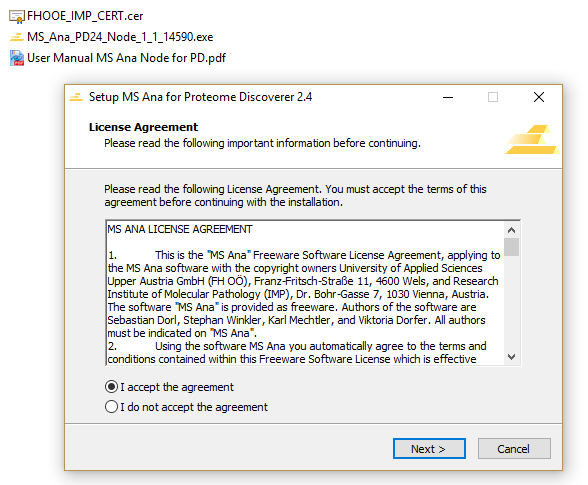
MS Ana is now ready for use in Proteome Discoverer! For detailed documentation please refer to the MS Ana user manual which is included with the download.
Please note: If you are experiencing problems during the installation because of Windows security services you need to use the provided certificate to add FHOÖ & IMP as a trusted software source. Double-click the FHOOE_IMP_CERT.cer, then choose ‘Install Certificate...’ and follow the instructions on screen.
Running MS Ana Spectral Library Search
Using MS Ana in Proteome Discoverer is similar to using any other identification node like Mascot or SEQUEST. Simply drag & drop the MS Ana node into your workflow and connect it to its predecessor and successor nodes. You will need to select a spectral library that was previously registered to Proteome Discoverer.
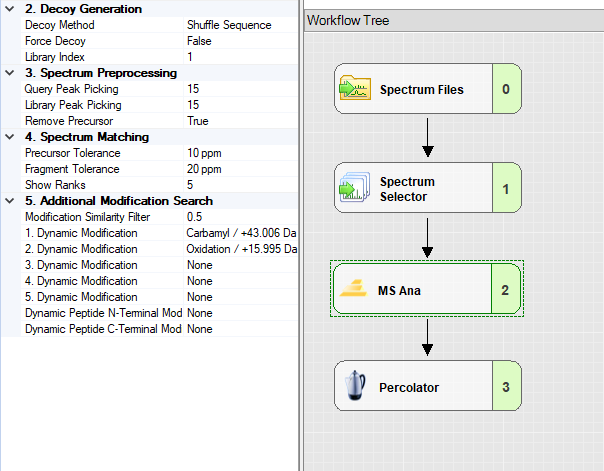
Adding Spectrum Libraries to Proteome Discoverer
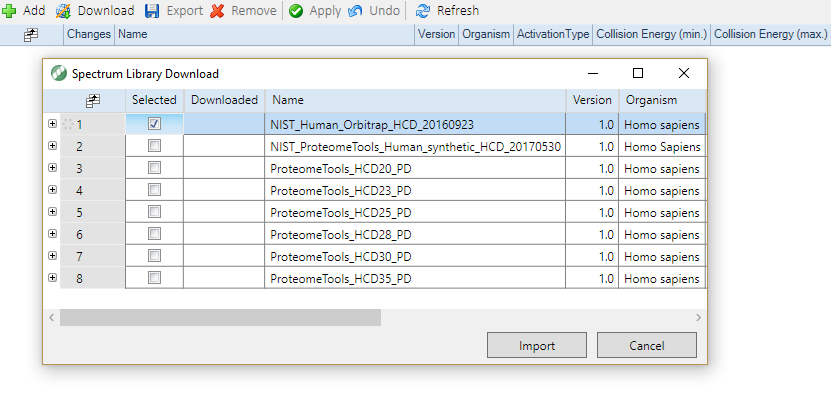
To run a workflow with MS Ana you must first add a spectral library using the spectral library tab in Proteome Discoverer. Suitable libraries for different standard organisms can be downloaded directly through the Proteome Discoverer or from the MassIVE website or the NIST website. In Proteome Discoverer go to Administration, 'Maintain Spectrum Libraries'. Then select either Download to add standard libraries from Proteome Discoverer or Add (+) to import a library from your hard drive.
Contact
This research project is a collaboration of the Protein Chemistry Group at the IMP, Vienna and the Bioinformatics Research Group at the FH Upper Austria, Hagenberg Campus. For any further questions, bug reports, or ideas please contact: Sebastian Dorl, Viktoria Dorfer, Stephan Winkler, Karl Mechtler, or post your comment in the IMP Nodes for Proteome Discoverer Google Group.