IMP-apQuant
IMP-apQuant is a Proteome Discoverer node for accurate and precise label-free quantification of peptides and proteins.
Downloads for 8 PD versions
IMP-apQuant-Setup.exe
SHA-256 dfdc210be27a65d48efbd714d08c3dc0310cd3b6849096c6f9b2f263e1788911
| SHA-256 | dfdc210be27a65d48efbd714d08c3dc0310cd3b6849096c6f9b2f263e1788911 |
|---|---|
| MD5 | 5d694f895327d9ccf99ba82bd4ce4106 |
Downloads the file and checks its SHA-256; a click selects a whole checksum or command.
$ProgressPreference = 'SilentlyContinue'; $f = 'IMP-apQuant-Setup.exe'; Invoke-WebRequest -Uri 'https://ms.imp.ac.at/data/apQuant/IMP-apQuant-Setup.exe' -OutFile $f; if ((Get-FileHash $f -Algorithm SHA256).Hash -eq 'dfdc210be27a65d48efbd714d08c3dc0310cd3b6849096c6f9b2f263e1788911') { "OK: $f" } else { Remove-Item $f; Write-Error 'Checksum mismatch, file deleted' }curl -fL -o 'IMP-apQuant-Setup.exe' 'https://ms.imp.ac.at/data/apQuant/IMP-apQuant-Setup.exe' && echo 'dfdc210be27a65d48efbd714d08c3dc0310cd3b6849096c6f9b2f263e1788911 IMP-apQuant-Setup.exe' | sha256sum -c -curl -fL -o 'IMP-apQuant-Setup.exe' 'https://ms.imp.ac.at/data/apQuant/IMP-apQuant-Setup.exe' && echo 'dfdc210be27a65d48efbd714d08c3dc0310cd3b6849096c6f9b2f263e1788911 IMP-apQuant-Setup.exe' | shasum -a 256 -c -IMP-apQuant-Setup.exe
SHA-256 dfdc210be27a65d48efbd714d08c3dc0310cd3b6849096c6f9b2f263e1788911
| SHA-256 | dfdc210be27a65d48efbd714d08c3dc0310cd3b6849096c6f9b2f263e1788911 |
|---|---|
| MD5 | 5d694f895327d9ccf99ba82bd4ce4106 |
Downloads the file and checks its SHA-256; a click selects a whole checksum or command.
$ProgressPreference = 'SilentlyContinue'; $f = 'IMP-apQuant-Setup.exe'; Invoke-WebRequest -Uri 'https://ms.imp.ac.at/data/apQuant/IMP-apQuant-Setup.exe' -OutFile $f; if ((Get-FileHash $f -Algorithm SHA256).Hash -eq 'dfdc210be27a65d48efbd714d08c3dc0310cd3b6849096c6f9b2f263e1788911') { "OK: $f" } else { Remove-Item $f; Write-Error 'Checksum mismatch, file deleted' }curl -fL -o 'IMP-apQuant-Setup.exe' 'https://ms.imp.ac.at/data/apQuant/IMP-apQuant-Setup.exe' && echo 'dfdc210be27a65d48efbd714d08c3dc0310cd3b6849096c6f9b2f263e1788911 IMP-apQuant-Setup.exe' | sha256sum -c -curl -fL -o 'IMP-apQuant-Setup.exe' 'https://ms.imp.ac.at/data/apQuant/IMP-apQuant-Setup.exe' && echo 'dfdc210be27a65d48efbd714d08c3dc0310cd3b6849096c6f9b2f263e1788911 IMP-apQuant-Setup.exe' | shasum -a 256 -c -IMP-apQuant-Setup.exe
SHA-256 dfdc210be27a65d48efbd714d08c3dc0310cd3b6849096c6f9b2f263e1788911
| SHA-256 | dfdc210be27a65d48efbd714d08c3dc0310cd3b6849096c6f9b2f263e1788911 |
|---|---|
| MD5 | 5d694f895327d9ccf99ba82bd4ce4106 |
Downloads the file and checks its SHA-256; a click selects a whole checksum or command.
$ProgressPreference = 'SilentlyContinue'; $f = 'IMP-apQuant-Setup.exe'; Invoke-WebRequest -Uri 'https://ms.imp.ac.at/data/apQuant/IMP-apQuant-Setup.exe' -OutFile $f; if ((Get-FileHash $f -Algorithm SHA256).Hash -eq 'dfdc210be27a65d48efbd714d08c3dc0310cd3b6849096c6f9b2f263e1788911') { "OK: $f" } else { Remove-Item $f; Write-Error 'Checksum mismatch, file deleted' }curl -fL -o 'IMP-apQuant-Setup.exe' 'https://ms.imp.ac.at/data/apQuant/IMP-apQuant-Setup.exe' && echo 'dfdc210be27a65d48efbd714d08c3dc0310cd3b6849096c6f9b2f263e1788911 IMP-apQuant-Setup.exe' | sha256sum -c -curl -fL -o 'IMP-apQuant-Setup.exe' 'https://ms.imp.ac.at/data/apQuant/IMP-apQuant-Setup.exe' && echo 'dfdc210be27a65d48efbd714d08c3dc0310cd3b6849096c6f9b2f263e1788911 IMP-apQuant-Setup.exe' | shasum -a 256 -c -IMP-apQuant-Setup.exe
SHA-256 dfdc210be27a65d48efbd714d08c3dc0310cd3b6849096c6f9b2f263e1788911
| SHA-256 | dfdc210be27a65d48efbd714d08c3dc0310cd3b6849096c6f9b2f263e1788911 |
|---|---|
| MD5 | 5d694f895327d9ccf99ba82bd4ce4106 |
Downloads the file and checks its SHA-256; a click selects a whole checksum or command.
$ProgressPreference = 'SilentlyContinue'; $f = 'IMP-apQuant-Setup.exe'; Invoke-WebRequest -Uri 'https://ms.imp.ac.at/data/apQuant/IMP-apQuant-Setup.exe' -OutFile $f; if ((Get-FileHash $f -Algorithm SHA256).Hash -eq 'dfdc210be27a65d48efbd714d08c3dc0310cd3b6849096c6f9b2f263e1788911') { "OK: $f" } else { Remove-Item $f; Write-Error 'Checksum mismatch, file deleted' }curl -fL -o 'IMP-apQuant-Setup.exe' 'https://ms.imp.ac.at/data/apQuant/IMP-apQuant-Setup.exe' && echo 'dfdc210be27a65d48efbd714d08c3dc0310cd3b6849096c6f9b2f263e1788911 IMP-apQuant-Setup.exe' | sha256sum -c -curl -fL -o 'IMP-apQuant-Setup.exe' 'https://ms.imp.ac.at/data/apQuant/IMP-apQuant-Setup.exe' && echo 'dfdc210be27a65d48efbd714d08c3dc0310cd3b6849096c6f9b2f263e1788911 IMP-apQuant-Setup.exe' | shasum -a 256 -c -IMP-apQuant-Setup.exe
SHA-256 dfdc210be27a65d48efbd714d08c3dc0310cd3b6849096c6f9b2f263e1788911
| SHA-256 | dfdc210be27a65d48efbd714d08c3dc0310cd3b6849096c6f9b2f263e1788911 |
|---|---|
| MD5 | 5d694f895327d9ccf99ba82bd4ce4106 |
Downloads the file and checks its SHA-256; a click selects a whole checksum or command.
$ProgressPreference = 'SilentlyContinue'; $f = 'IMP-apQuant-Setup.exe'; Invoke-WebRequest -Uri 'https://ms.imp.ac.at/data/apQuant/IMP-apQuant-Setup.exe' -OutFile $f; if ((Get-FileHash $f -Algorithm SHA256).Hash -eq 'dfdc210be27a65d48efbd714d08c3dc0310cd3b6849096c6f9b2f263e1788911') { "OK: $f" } else { Remove-Item $f; Write-Error 'Checksum mismatch, file deleted' }curl -fL -o 'IMP-apQuant-Setup.exe' 'https://ms.imp.ac.at/data/apQuant/IMP-apQuant-Setup.exe' && echo 'dfdc210be27a65d48efbd714d08c3dc0310cd3b6849096c6f9b2f263e1788911 IMP-apQuant-Setup.exe' | sha256sum -c -curl -fL -o 'IMP-apQuant-Setup.exe' 'https://ms.imp.ac.at/data/apQuant/IMP-apQuant-Setup.exe' && echo 'dfdc210be27a65d48efbd714d08c3dc0310cd3b6849096c6f9b2f263e1788911 IMP-apQuant-Setup.exe' | shasum -a 256 -c -IMP-apQuant-Setup.exe
SHA-256 dfdc210be27a65d48efbd714d08c3dc0310cd3b6849096c6f9b2f263e1788911
| SHA-256 | dfdc210be27a65d48efbd714d08c3dc0310cd3b6849096c6f9b2f263e1788911 |
|---|---|
| MD5 | 5d694f895327d9ccf99ba82bd4ce4106 |
Downloads the file and checks its SHA-256; a click selects a whole checksum or command.
$ProgressPreference = 'SilentlyContinue'; $f = 'IMP-apQuant-Setup.exe'; Invoke-WebRequest -Uri 'https://ms.imp.ac.at/data/apQuant/IMP-apQuant-Setup.exe' -OutFile $f; if ((Get-FileHash $f -Algorithm SHA256).Hash -eq 'dfdc210be27a65d48efbd714d08c3dc0310cd3b6849096c6f9b2f263e1788911') { "OK: $f" } else { Remove-Item $f; Write-Error 'Checksum mismatch, file deleted' }curl -fL -o 'IMP-apQuant-Setup.exe' 'https://ms.imp.ac.at/data/apQuant/IMP-apQuant-Setup.exe' && echo 'dfdc210be27a65d48efbd714d08c3dc0310cd3b6849096c6f9b2f263e1788911 IMP-apQuant-Setup.exe' | sha256sum -c -curl -fL -o 'IMP-apQuant-Setup.exe' 'https://ms.imp.ac.at/data/apQuant/IMP-apQuant-Setup.exe' && echo 'dfdc210be27a65d48efbd714d08c3dc0310cd3b6849096c6f9b2f263e1788911 IMP-apQuant-Setup.exe' | shasum -a 256 -c -IMP-apQuant-Setup.exe
SHA-256 dfdc210be27a65d48efbd714d08c3dc0310cd3b6849096c6f9b2f263e1788911
| SHA-256 | dfdc210be27a65d48efbd714d08c3dc0310cd3b6849096c6f9b2f263e1788911 |
|---|---|
| MD5 | 5d694f895327d9ccf99ba82bd4ce4106 |
Downloads the file and checks its SHA-256; a click selects a whole checksum or command.
$ProgressPreference = 'SilentlyContinue'; $f = 'IMP-apQuant-Setup.exe'; Invoke-WebRequest -Uri 'https://ms.imp.ac.at/data/apQuant/IMP-apQuant-Setup.exe' -OutFile $f; if ((Get-FileHash $f -Algorithm SHA256).Hash -eq 'dfdc210be27a65d48efbd714d08c3dc0310cd3b6849096c6f9b2f263e1788911') { "OK: $f" } else { Remove-Item $f; Write-Error 'Checksum mismatch, file deleted' }curl -fL -o 'IMP-apQuant-Setup.exe' 'https://ms.imp.ac.at/data/apQuant/IMP-apQuant-Setup.exe' && echo 'dfdc210be27a65d48efbd714d08c3dc0310cd3b6849096c6f9b2f263e1788911 IMP-apQuant-Setup.exe' | sha256sum -c -curl -fL -o 'IMP-apQuant-Setup.exe' 'https://ms.imp.ac.at/data/apQuant/IMP-apQuant-Setup.exe' && echo 'dfdc210be27a65d48efbd714d08c3dc0310cd3b6849096c6f9b2f263e1788911 IMP-apQuant-Setup.exe' | shasum -a 256 -c -IMP-apQuant_PD_2_1_setup_wo_R.exe
SHA-256 a471b29242e8dd2c0a50b1d87f7d6e3e69a43f4e155300489d95fa1d53be0a88
| SHA-256 | a471b29242e8dd2c0a50b1d87f7d6e3e69a43f4e155300489d95fa1d53be0a88 |
|---|---|
| MD5 | 4169aa1bf66cc0d965a16674021933d3 |
Downloads the file and checks its SHA-256; a click selects a whole checksum or command.
$ProgressPreference = 'SilentlyContinue'; $f = 'IMP-apQuant_PD_2_1_setup_wo_R.exe'; Invoke-WebRequest -Uri 'https://ms.imp.ac.at/data/apQuant/IMP-apQuant_PD_2_1_setup_wo_R.exe' -OutFile $f; if ((Get-FileHash $f -Algorithm SHA256).Hash -eq 'a471b29242e8dd2c0a50b1d87f7d6e3e69a43f4e155300489d95fa1d53be0a88') { "OK: $f" } else { Remove-Item $f; Write-Error 'Checksum mismatch, file deleted' }curl -fL -o 'IMP-apQuant_PD_2_1_setup_wo_R.exe' 'https://ms.imp.ac.at/data/apQuant/IMP-apQuant_PD_2_1_setup_wo_R.exe' && echo 'a471b29242e8dd2c0a50b1d87f7d6e3e69a43f4e155300489d95fa1d53be0a88 IMP-apQuant_PD_2_1_setup_wo_R.exe' | sha256sum -c -curl -fL -o 'IMP-apQuant_PD_2_1_setup_wo_R.exe' 'https://ms.imp.ac.at/data/apQuant/IMP-apQuant_PD_2_1_setup_wo_R.exe' && echo 'a471b29242e8dd2c0a50b1d87f7d6e3e69a43f4e155300489d95fa1d53be0a88 IMP-apQuant_PD_2_1_setup_wo_R.exe' | shasum -a 256 -c -Not supported: PD1.3, PD1.4, PD2.0, PD2.2.
Features
- NEWQuantification of Crosslink Areas (Proteome Discoverer 2.3 and up)
- FDR based quantification confidence
- Machine-learning based scoring algorithm
- Retention time alignment
- Visualisation of extracted ion chromatograms and integration boundaries
- Peptide identity propagation ("match between runs")
- Support of razor peptides, TopN and iBAQ
Manual
Proteome Discoverer version
Prerequisites
apQuant requires:- an installation of Proteome Discoverer version 2.1
- an installation of R
Installation
- FIRST Install R (available at CRAN)
- Download and run the IMP-apQuant installer
Prerequisites
apQuant requires:- an installation of Proteome Discoverer version 2.3
Installation
- Download and run the IMP-apQuant installer
Prerequisites
apQuant requires:- an installation of Proteome Discoverer version 2.4
Installation
- Download and run the IMP-apQuant installer
Prerequisites
apQuant requires:- an installation of Proteome Discoverer version 2.5 or 3.0-3.3
Installation
- Download and run the IMP-apQuant installer
Sample Workflow
This sample workflow should make you ready to go. It is the workflow to analyse the Ramus et al data set which is also used in the performance comparison further down in the Performance section.
Support
We have a forum. Feel free to ask questions and give feedback!
Performance
We benchmarked IMP-apQuant on a publicly available dataset (Ramus et al). The original raw files are available on PRIDE (PXD001819). The samples are comprised of UPS1 protein mix spiked in at different concentrations into a 1:1 yeast background. This dataset was used in a comparison for different LFQ algorithms (Veit et al). We used results published there as Supplementary Data in order to compare the performance of IMP-apQuant to LFQProfiler(OpenMS), MaxQuant, MFPaQ and Skyline.
IMP-apQuant outperforms these tools by enabling the detection of more differentially abundant UPS proteins at the same number of falsely identified (unregulated) yeast proteins.
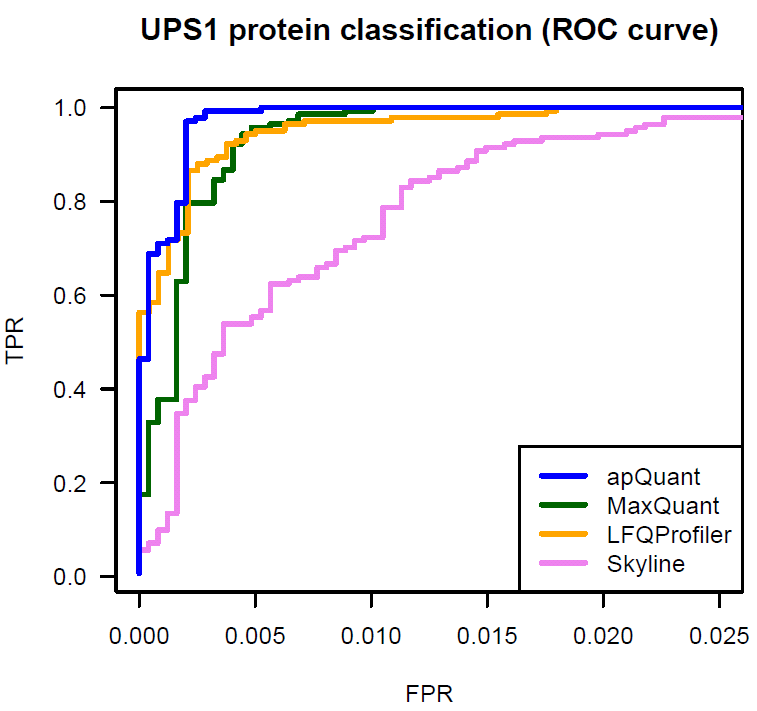
The Proteome Discoverer workflow to reproduce this result is available for download and provides a starting point for easy incorporation of IMP-apQuant in your workflow. Furthermore the final results file is also available here.
Downloads:
please dowload these files using right-click - "Save Link as..."- Ramus et al data
- PD Workflow
- PD Result (5.1 GB !)
- Kloet et al data
- PD Workflow
- PD Result (820 MB !)
What's new?
| Date | Version | Info |
|---|---|---|
| 2019-01-28 | 3.1 | included crosslink quantification |
| 2017-12-19 | 3.0 | project renamed to IMP-apQuant |
| 2017-05-30 | 3.0 | feature based scoring of quantification confidence, iBAQ support |
| 2016-11-09 | 2.18 | RAM and time usage reduced, stability fixes |
| 2016-07-25 | 2.15 | scoring finalized, stability fixes |
| 2016-06-16 | 2.14 | RAM usage decreased, separate installer for PD 2.0 |
| 2016-06-02 | 2.13 | several small bug fixes |
| 2015-05-25 | initial release |
Screenshots
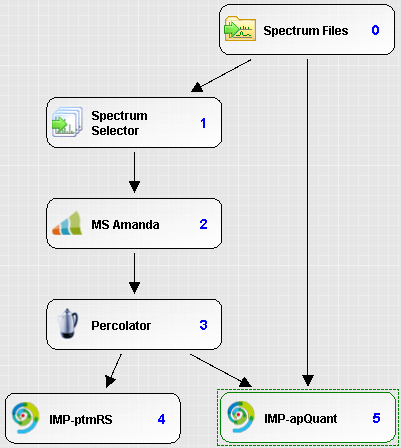
Processing workflow
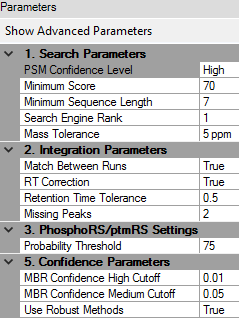
Processing parameters
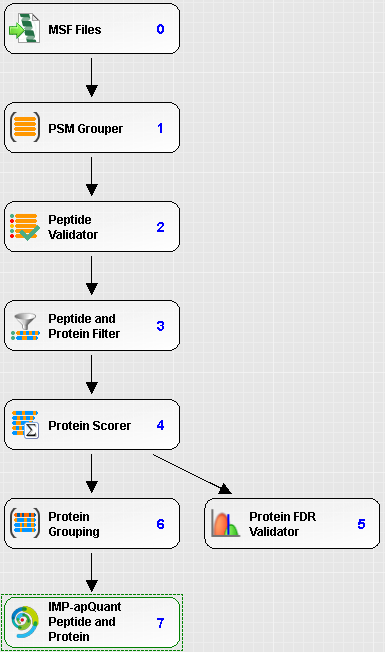
Consensus workflow

Consensus parameters

Peptides
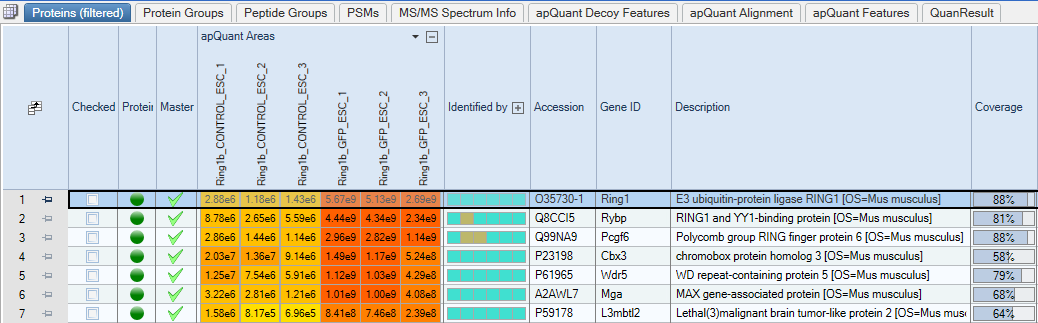
Proteins
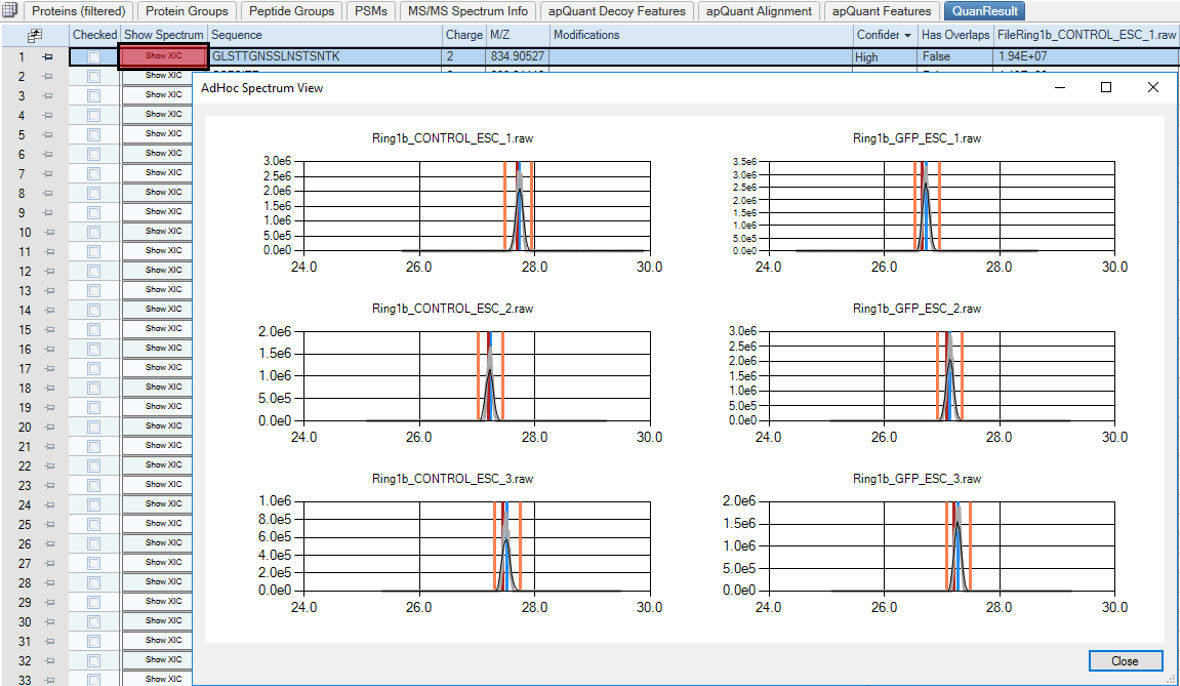
Extracted ion chromatogram of a peptide in six samples.
PSMs are depicted in red, integration boundaries in orange and the peaks center of gravity in blue.